

The Curious Case of the Screen Robber.
- infamousproduction0
- May 10, 2021
- 3 min read

This idea for hugely inspired by Zach King, Zach is an amazing editor who makes all kinds of creative effects. Honestly the guy is a magician and makes each of his edits seem like magic.
I was always curious as to how he did his effects, looking through some videos on YouTube brought me to a channel ran by Skyler Thomas and his video, Zach King Style Green Screen Trick - The Screen Thief Tutorial. More or less was all the encouragement I needed to attempt this video myself.
Getting Started.
For this my fiancé gave me a hand, I recorded a clip of her behind the Green Screen in the living room and adjusted the screen to be low enough so she could reach over it and grab the Milkybar Buttons to give the effect that she was reaching out of the computer monitor.
The second clip I had her reading a book in front of my computer set up, this would be where I would add the video we filmed in the living room. I assembled the clips in Premiere Pro, I timed the steal as Bowie reacted to the glitch effect I would add later to the screen.

I resized the clip of the steal, used ultra key to get rid of the green screen and played around with the position to try and have the Milkybar sweets on the desk.

The next thing was to drop the opacity which allowed me to resize and to draw an accurate mask around the screen, after I had the mask drawn I altered the position of the clip to make it more inline with the bevels of the monitor. This took me a few attempts as the masks lines I initially drew weren't straight.
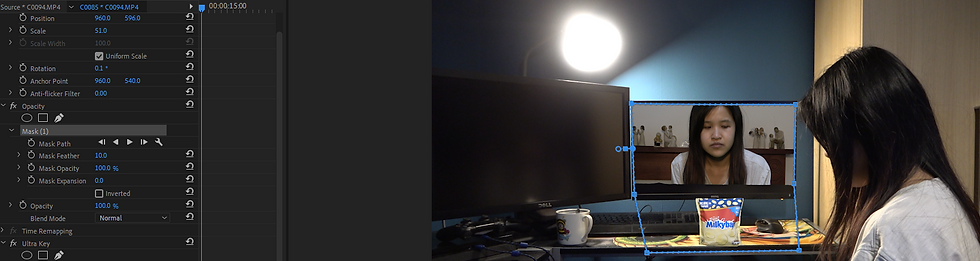
When I was piecing this together I noticed error during play back that I didn't record the footage with the sweets in the shot, I felt like an idiot and thought I would have to reshoot this. But I decided instead to copy and paste the clip of the steal taking place, deleted the mask and created another mask around and added it in. I zoomed in as close as I could in order to preserve the shape of the packet to make it look as realistic as possible, if you look closely in the screen shot above it didn't look like it belonged in the scene. I planned to try and use colour correction later to see if I could blend it in.

After I unlinked the video and got rid of the audio, I then trimmed the clip before Bowie's hand reached through to make it look like a static bag sitting there and copied the new clip of the Milkybar bag's mask a few times in order for it to fill the time in it should have been there. I made sure that all the positions etc were all the same as that of the mask to make sure that the bag would not jitter or shake in the shot.

I added an additional glitch effect to hide some of the camera shake and give a smooth transition out, looking back over the clip I was happy with how the scene looked and as I mentioned earlier all I needed to do was some colour correction to see if I could get the buttons to blend better in the scene.

With the above setting, I think I achieved it. The bag looked like it belonged but adding a creative effect to make the scene all look similar in colour tone, with the packet of sweets being pale the bleach effect made it look right at home on the desk.
Wrapping Up.
I really enjoyed working on this, I can see why some of Zach King's edits take the time that they do it's all in the little details that he focuses on to make sure that it is believable. I honestly thing it would be a very practical skill to keep as these could be implemented in a variety of ways depending on what it is you are trying to achieve, if you can think of a clever set up it adds so much more to your edit.
Thanks for reading!


Comments