

Shoot out!
- infamousproduction0
- May 10, 2021
- 4 min read
Assembling a Simple Shoot Out.

I apologise for the blog spam, with my schedule over the last week and a half this has just been easier to shoot, edit these clips and then update the blog when I had the time reflect on the clips.
I used my camera and a lamp for this shoot, the lamp had a foot peddle that I could use to activate the light. My plan was to use a replica S.A.A (Single Action Army) that I own and react to light coming on to pull the trigger. This was mainly to emulate the flash of a real gun, in the dark hallway that I had used I thought the burst of light when shooting when make the gunshot seem more real.
Below is the set up that I had used.

Getting Started.
I used Premiere Pro for this and positioned everything on the time line that I needed at the time to get everything set up prior to adding any Green Screen effects that I had found on YouTube to use for the scene. (I will link these at the end after the video).

I then added the muzzle flash Green Screen effect that I found and positioned it at the end of the S.A.A I tweaked these values to until I was happy with the position looked and keyed out the Green Screen using Ultra Key.

After I had keyed out the Green Screen I tweaked the size, orientation, duration of the muzzle flash and duplicated the short clip for compensate for both shots in order to make it fit the scene better. The S.A.A being an older gun, from what I researched it had a decent sized muzzle flash due to it being an old fashioned style gun it doesn't have the technology to supress the flash as well as other modern guns of it's calibre.
I finally changed the blend mode to Hard Light in order to make the flash stand out more, whilst it is just a quick flash I thought it was important to keep that detail there.

The next thing to do was to tweak the sound values for the muzzle shots, they were a little low from the YouTube video and didn't match the scene. I played with the sliders and then moved onto the pre-sets available in Premiere Pro, selecting SFX, Room Reverb and adjusted the sliders until I was happy with the result.

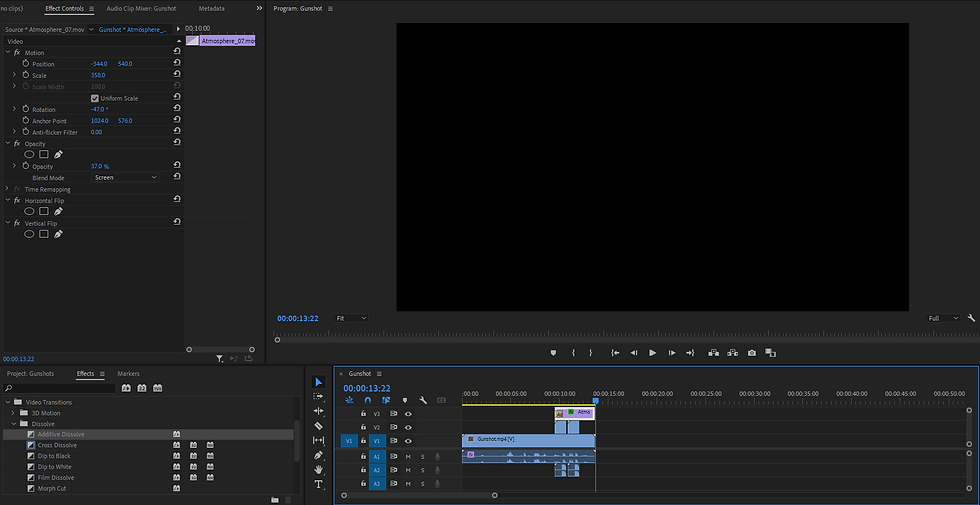
When I was tweaking the gunshots it had occurred to me that guns also produce smoke when fired, after two shots I would be expect to see some after firing. I used the atmosphere smoke that Jonny had provided in an earlier lesson for the Parralax effect. I positioned it towards the right corner of the screen, added a dissolve, lowered the opacity and a flip effect to make the smoke look like it was originating from around the corner where the gun was firing.
In the video, I had my Grandad stand in the kitchen and pull back the bolt on an old airsoft rifle that I had to work as my audio que to take over at the wall. However, I thought that this wasn't adequate so I added a radio effect and tweaked sound. The idea for the scene was someone coming home to an ambush, so the quick flicker of the radio followed by the lock of the gun bolt I thought would make the scene more realistic.

Added bullet holes to the time line as well as dust explosions, positioned them and timed their entry with the shots by going frame by frame. I then tweaked the values for the bullet hole and the dust in the edit window to try and give them a more believable look to make them feel more real in the scene, I adjusted the size, positions, scale and opacity. I chose darken for both of the effects to contrast against the white wall that was in the background.

Wrapping Up.
I didn't feel like I needed to colour correct the scene as I decided to make it dark on purpose to make the light of my lamp flashing more effective. Although this was as simple compilation of resources blended together I really enjoyed this effect as it was a bit more action related in comparison to other things I have posted.
I think that when you shoot a scene with a specific goal in mind, like firing a gun it gives a clear sense of purpose and direction to where you go with the effect. I think that it is by far a better way to go when you are experimenting with effects as it makes you ask questions as to what you would need if this were a real instance. I haven't had much time to play with 3dD modelling due to my responsibilities outside of University but if I were to add one thing to the scene it would be a 3D asset like a man in power armour from Fallout walking out of the door after the radio chatter.
Thanks for reading!
YouTube/Online Resources:
Below is the Green Screen Effects used in the video above.
Muzzle Flashes - https://www.youtube.com/watch?v=iZQkLqxhclE
Radio Sound Effect - https://www.youtube.com/watch?v=f8aS8Vbu9ug
Bullet Impact and Sparks - https://www.youtube.com/watch?v=HgxOpgW0otw


Comments